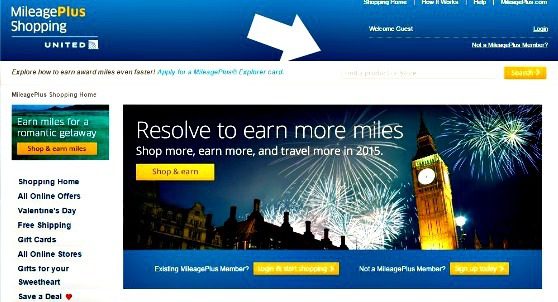


Shopping portals are shopping websites that are connected with some airline or hotel loyalty programs, as well as through banks like Chase and Capital One.
With just a small tweak to your online shopping routine, you can easily earn a lot of points and miles for the things you’re probably already planning to buy.
Here’s the best part. You don’t need to shop at new stores. You can use these shopping portals to earn miles and points with hundreds of the same merchants where you probably already shop!
Any member of the loyalty program can use these shopping portals regardless of their credit score or financial history, which makes shopping portals an especially smart choice for people who want to earn miles and points but have a harder time getting approved for travel rewards credit cards.
It gets even better. If you have a miles and points earning credit card, the miles and points earned from a shopping portal are in addition to the points and miles you would earn from using your card.

Example: Let’s say you have a credit card like the Chase Freedom Flex, which gives you 5x the points on rotating bonus categories.
During a department store bonus period, you’d earn 5x the points from your Freedom Flex card at department stores. But, when you shop at that same department store through a shopping portal, you’d earn points and miles from the portal. These points or miles would be on top of what you’d earn from your Freedom Flex card.
It’s Simple to Get Started
Here are links to the travel and bank brands that offer shopping portals.
American Airlines Chase Ultimate Rewards JetBlue
Delta Southwest Rakuten (can earn Amex points)
United Airlines Capital One Shopping
To shop in the Chase or Capital One shopping portals, you’ll need a credit card with that bank.
Rakuten is typically a cashback shopping portal. However, they’ve partnered with American Express. So if you have an American Express card that earns Membership Rewards points, you can change the settings on your Rakuten account to earn points with Amex instead of cashback.
The airline shopping portals are for all members of their loyalty programs. You can sign up for free to become a member of any/all of these loyalty programs. Once you join the airline’s loyalty program, use your member number to sign up or sign in and shop through that specific shopping portal. It’s not necessary to have a co-branded airline credit card.
Once you sign in, type in the name of the merchant you would like to shop with or browse the hundreds of merchants in the various shopping categories.
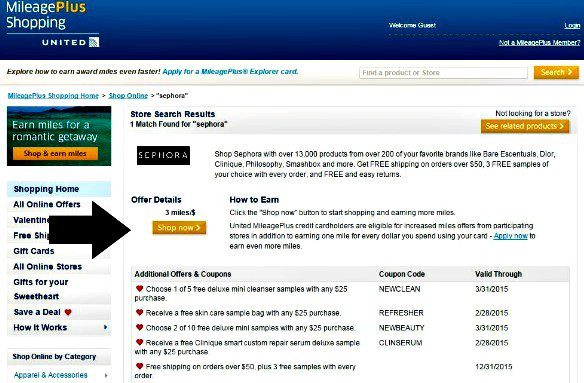
Here is an example on the United MileagePlus Shopping Portal.
I searched for Addidas. You can see the return rate for Addidas was 3 miles per $1.

To earn the extra 3 miles per dollar spent, you simply click the “Shop this offer” to confirm and the portal redirects you to that merchant’s website. You’re shopping on the Adidas website like you would have.
If there are available coupon codes, they will usually be displayed in the shopping portal on the screen before you are redirected to the merchant’s website.
External coupon codes not appearing in a shopping portal (like a special one a brand emails you) typically cancel out any miles and points earned through the portal and should be avoided if you want to earn the added miles and points.
Also, it’s important to know that purchasing gift cards through a shopping portal usually doesn’t earn any miles and points. But, you can pay with a gift card and still earn miles and points!
Shop and checkout like you normally would. Miles and points earned from the portal will appear on your loyalty or credit card account statement in a few weeks.
ProTip: United even has an app called MileagePlus X. You can use this app before shopping in the United portal to stack more earnings or to earn for in-store shopping.
Want to be an even savvier portal shopper? Keep reading!
I use Cashback Monitor to compare earn rates between different shopping portals. The earn rates are usually up-to-date and it saves time because I don’t have to go to each portal individually.
Simply type the name of the merchant you’d like to shop with into the search field.

Since I am a frequent shopper for personal and household supplies, I searched for Walgreens. These were the results I saw on my screen.

From here, you can decide to go with the portal giving you the highest earn rate. Here in this example, JetBlue will give you 3 miles per $1 spent at Walgreens. If you earn American Express points with Rakuten, you could also earn 3x the Membership Rewards points.
Or, depending on your travel goal(s), it might make more sense to choose a shopping portal that gets you closer to reaching your goal(s).
If you’re saving up miles to earn the Southwest Companion Pass, then the Southwest Portal will be where you want to shop.
What doesn’t make sense is to choose a shopping portal for a loyalty program you don’t use just because it has the highest earn rate.
For example, if you don’t fly Southwest, then it doesn’t make sense to use the Southwest shopping portal even if it earns the highest number of points.
Using shopping portals can help you get the most out of your money by giving you a return in miles and points.
This can go a long way in earning award travel that’ll help you reach your travel goals.
How to Use Shopping Portals in 3 Easy Steps
- Make sure you’re signed up for the loyalty programs connected to the shopping portal where you want to shop.
- When you’re ready to shop, check the earn rates for the merchant you want at Cashbackmonitor.
- Go to the best/highest shopping portal for your needs and click through to that merchant to shop as you’d normally do.
Make this one tweak to your online shopping routine and get more value back for every dollar you spend in the form of travel rewards that can be redeemed for flights, hotels, and more!
What questions do you have about earning miles and points with shopping portals?
Like this post? Please share it on social media using the share buttons below.